




What is FBI moneypak virus?
FBI Moneypak Virus is a big issue to computer users, because it completely blocks internet connection , Task Manager, Registry Editor and other executable files. User is left under a locked screen where he can only see the fake FBI virus alert. This alert says, that if you will pay $100 , your computer will get unlocked in 24-72 hours. However, it is a virus, and probably your computer won't be unlocked even if you pay the fine.
Some more fake alerts:
Error
Keylogger activity detected. System information security is at risk. It is recommended to activate protection and run a full system scan.
Warning! Identity Theft attempt detected!
Hidden connection IP: 210.1.58.100
Target: Microsoft corporation keys
Your IP: 127.0.0.1
Green AV is a fake antivirus software that looks like AntvirusBEST. The rogue distributed through the use fake online malware scanners that tells you that your computer infected with a lot of infections and that you must install Green AV in order to clean your computer. During installation, Green AV is set to start automatically when your computer starts. Immediately after launch, the program starts scanning the computer and list a variety of threats that will not be fixed unless you first purchase the scareware. All of these threats are fake, so you can safely ignore them.
SaveArmor is a rogue antispyware program that designed only for one, to trick you into thinking that your computer is infected. Immediately after launch, SaveArmor will begin to scan your computer and list a large amount of infected files, but all of these files are harmless and were created by the rogue. So you can safely ignore these results. SaveArmor uses false scan results as a method of scaring you into buying the software!
XP Deluxe Protector is a rogue antispyware program from XP Police Antivirus family ( Win PC Defender,
WinBlueSoft is rogue antispyware program, new version of
Signs of Impending Hard Drive Failure
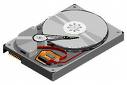
Clicking noises are heard coming from your hard drive
Your computer takes a long time to boot up
Your computer freezes frequently
Blue Screens

Technical Concierge Networking Services:
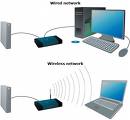
Does your office need a new computer network?
Is your Email system not working
Is your staff unable to work because of network problems
Corporate computer support can't fix your networking problem?
Comcast or Verizon claim everything is fine but nothing works
Install a New Router, Switch, Firewall
Switching Internet providers and need help migrating?
Network design and installation
Network hardware repair and troubleshooting
Warranty

ron@somdComputerRepairs.com
12400 Circa Ct.
Upper Marlboro,Md
This site was last updated 03/25/14
 |
|
 |
|


Copyright© 2009 SOMD Computer Repairs