Fake Anti Virus Prevention Tips
1. Use Firefox as your
browser
rather than Internet Explorer.
2. Keep your computer updated with the latest
anti-virus and anti-spyware
software, and be sure to use a good firewall.
3. Never open an email attachment unless you are
POSITIVE about the source.
4. Do NOT click on any pop-up that advertises
anti-virus or anti-spyware software, especially a program promising to provide
every feature known to mankind. (Also remember: the fakes often mimic
well-known brands such as Grisoft AVG, Norton and
McAfee.)
5. If a virus alert appears on your screen, do NOT
touch it. Don't use your mouse to eliminate or scan for viruses, and DON'T use
your mouse to close the window. Instead, hit control + alt + delete to view a
list of programs currently running. Delete the "rogue" from the list of
running programs, and call your computer maker's phone or online tech support
service to learn if you can safely use your computer.
6. Do not download freeware or shareware unless you
know it's from a reputable source. We use
Download.com and
VersionTracker.
Unfortunately, freeware and shareware programs often
come bundled with spyware, adware or fake anti-virus programs.
7. Avoid questionable websites. Some sites may
automatically download malicious software onto your computer.
8. Reset your current
security
settings
to a higher level.
9. Although fake software may closely resemble the
real thing, it's rarely an exact match. Look for suspicious discrepancies.
10. Check out this list of rogue/fake anti-virus and
anti-spyware products.
If your computer is infected by rogue software, stop
work and contact your computer manufacturer's tech-support hotline. Don't keep
using the computer. This may further damage your machine and provide identity
thieves with more information about you.
Use of fake anti-virus, anti-spyware software is a
fast-growing scam, especially as more people become aware of the dangers of
spyware, adware and malware. By following the tips above, however, you'll
better protect yourself from becoming the next victim of scammers, identity
thieves and hackers.
Here is a list of different types
Fake alerts
FBI Moneypak Virus is a big issue to computer users,
because it completely blocks internet connection , Task Manager, Registry
Editor and other executable files. User is left under a locked screen where
he can only see the fake FBI virus alert. This alert says, that if you will
pay $100 , your computer will get unlocked in 24-72 hours. However, it is a
virus, and probably your computer won't be unlocked even if you pay the
fine.
Some more fake alerts:
Error
Keylogger activity detected. System information security is at risk. It is
recommended to activate protection and run a full system scan.
Warning! Identity Theft attempt detected!
Hidden connection IP: 210.1.58.100
Target: Microsoft corporation keys
Your IP: 127.0.0.1
FBI Moneypak ransomware is a malicious software
that gets inside the system undetected. FBI Moneypak ransomware full
name is "The FBI Federal Bureau Investigation", and it tries to frighten
people into thinking that they did something illegal, like downloaded
copyrighted material on Internet and now FBI caught them. However, you
should not believe the bogus alert, even if you have broken the
Copyright laws, by using illegal download, P2P file sharing sites, and
so on, you should still ignore the fictitious FBI Moneypak messages, FBI
never blocks computers remotely and it never sends alerts directly to
your PC.
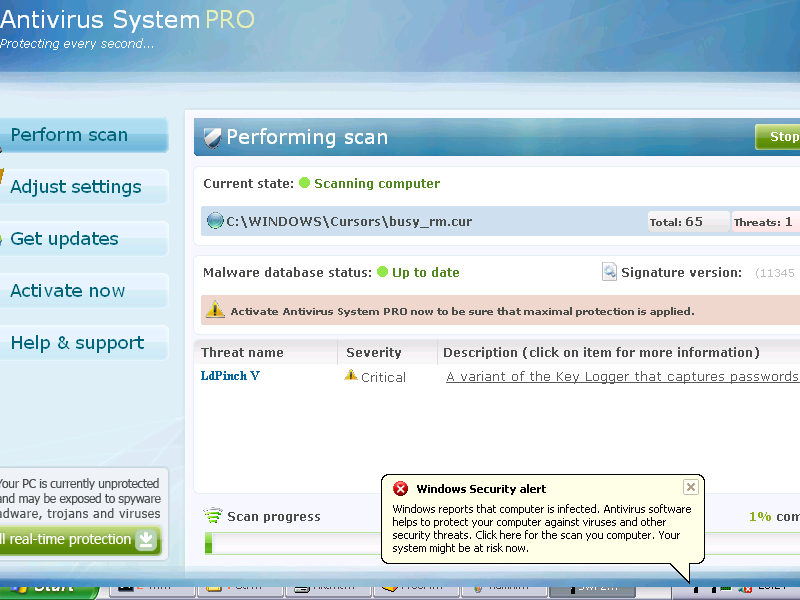
ntivirus System PROA
(aka AntivirusSystem PRO or AntivirusSystemPRO) appears
to be the representative of the new generation of rogue anti-spywares. Being a
clone of the infamous
Spyware Protect 2009
and
System Guard 2009
scarewares, Antivirus System PRO inherits its determinative traits; moreover,
the hackers have been driving a lot of traffic to the websites promoting it,
one of which is Antivirsystem.com. The tempo of Antivirus System PRO
propagation is enormous; equally great distribution rapidity as compared to
Antivirus System PRO is being currently exhibited by
Alpha Antivirus
rogueware which is another instance of ultimately fraudulent malvertising
product. Antivirus System PRO infiltrates the target computers through illicit
browser-hijacking techniques or via Trojans using backdoor tactics to trespass
undetected. When inside, Antivirus System PRO freeware will do its best to
convince the victim to register its license. For this purpose, Antivirus
System PRO usually floods the compromised system with its exaggerated popup
alerts that state the PC is badly infected and needs a remedy, i.e. Antivirus
System PRO full version which demands payment. The deceitful effect of
Antivirus System PRO pop-ups may he reinforced by its bogus security scanners
that emerge out of nowhere and claim to detect more infections on your
computer. The ultimate goal of Antivirus System PRO is to brainwash the victim
into purchasing its license; if the victim is “stubborn” and refrains from
installing the pimped scamware, Antivirus System PRO will attempt disrupting
the target system. Therefore, it’s strongly recommended to remove Antivirus
System PRO rogue as soon as possible.
KeepCop
is a rogue antispyware program. The software is not a security tool, it is a
dangerous computer parasite. Usually KeepCop is installed through the use of
trojans that come from fake online malware scanners. Once installed, the
trojan will install KeepCop onto your computer and will create a lot of
harmless files with random names in Windows and Windows\System32 folders,
which later during the scan, KeepCop will determine as infections. Important
to know that all of these infections are fake. The program is incapable to
detect any computer threats. So you can safely ignore all that KeepCop shows
you. It uses false scan results as method to to trick you into purchase
so-called “full” version of the software.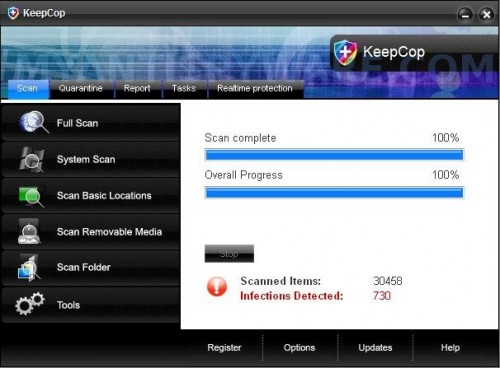
KeepCop
What is more, the same trojan that installs KeepCop
will also download and install a trojan FakeAlert. The trojan will show fake
Windows Security Center, nag screens, fake security alerts and notifications
from Windows task bar. An example:
Spyware Alert!
Your computer is infected with spyware. It could damage your
critical files or expose your private data on the Internet. Click
here to register your copy of KeepCop and remove
spyware threats from your PC.
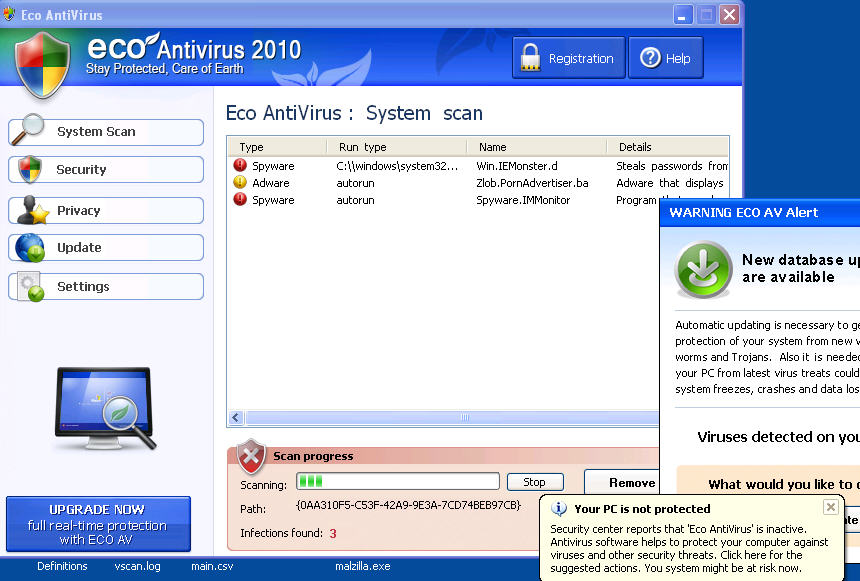
Eco
AntiVirus 2010 also known as Eco AV is a
rogue antispyware program from the same family as Green AV. It is distributed
through misleading advertisements that you may view when surfing the Internet.
Once you click on the advertisement, you will be redirected to a page that
pretend to be online malware scanner. It will report that your computer is
infected and you must install Eco AntiVirus 2010 to clean your PC.
Once installed, Eco AntiVirus 2010 will perform a system
scans and report numerous infections to make you think that your computer is
infected with trojans, spyware and other malware. Then it will ask you to pay
for a full version of the program to remove these threats. Of course, all of
these threats are fake and don’t actually exist on your computer. So you can
safely ignore them.
While Eco AntiVirus 2010 is running, you will be
shown nag screens, fake security alerts and other notifications from Windows
task bar. It will state that spyware activity detected, some system files were
modified, etc. Some of the alerts:
Eco AntiVirus
Internal conflict alert.
Eco AntiVirus detected internal software conflict. Some
applicztion tries to get access to system kernel (such behavior
is typical to Spyware/Malware). It may cause crash of your
computer.
Eco AntiVirus
System files modification alert!
Some critical system files of your computer were modified by
malicious program. It may cause system instability and data
loss. Click here to block unathorised modifications by removing
threats (Recommended).
The rogue will display a screen that looks like
legitimate Windows Security Center except that it will recommend you register
the ‘Eco AV’. Also Eco AntiVirus 2010 will hijack Internet Explorer and show a
message that the current page may be a phishing site or that your computer
might be at risk. However, all of these alerts, warnings and suggestions are
fake and like scan false results should be ignored!
If your computer is infected with Eco AntiVirus 2010,
then most importantly, do not purchase it! Uninstall the rogue from your PC as
soon as possible. Use the removal guide below to remove Eco AntiVirus 2010
from the system for free.
Additional Guard
is a rogue antispyware program. It is a clone of Windows Additional Guard,
which is also a fake antivirus program. Both programs are from the family of
VirusDoctor scareware. It is distributed through malicious web sites that are
disguised as online anti spyware scanners. It will stat that your computer is
infected and you must install the software to clean your PC. The software is a
trojan downloader. Once started, it will install the Additional Guard and
create numerous files with random names in %UserProfile%\Recent folder. The
files are made to appear as infections, but are in reality harmless.
Once running, Additional Guard will perform a scan of
your computer and display false scan results. It will state that your computer
is infected with adware, malware and trojans and that you should purchase the
software to remove these infections. Of course, these infections are all fake,
because Additional Guard identifies harmless files as dangerous infections. So
you can safely ignore the scan results.
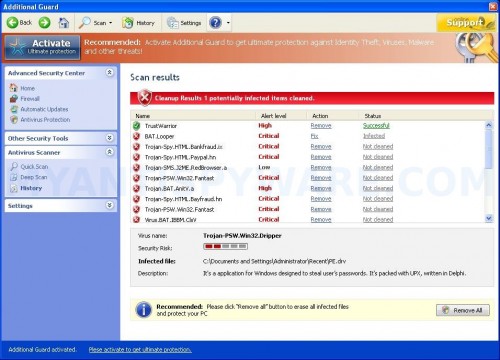
Additional Guard – scan results
While Additional Guard is running, it blocks Task
Manager and legitimate antivirus and antispyware programs (Kaspersky
Antivirus, DrWeb, AdAware, McAfee, Norton AV and much more). Your computer
will display fake warnings and fake security alerts from your Windows task
bar. Some of the alerts:
System alert!
Suspicious software which may be malicious has been
detected on your PC. Click here to remove this threat
immediately using Additional Guard.
System message
Your PC may still infected with dangerous viruses.
Additional Guard protection is needed to prevent data loss
and avoid theft of your personal data and credit card details.
Click here to activate protection.
Warning! Virus Detected
Threat detected: Trojan-PSW.Win32.Dripper
Also Additional Guard will hijack Internet Explorer
and randomly shows a “There is a problem with this websites`s secuirty”
warning page. Of course, all of these alerts and warnings are scam and like
scan false results should be ignored! If you find that your system is infected
with this malware, then most importantly, do not purchase it. Instead,
uninstall Additional Guard from your PC as soon as possible. Please follow the
guidelines below to remove this infection.
Koobface worm
infects computers via messages thats spreads through
Facebook, Twitter, Myspace and other social networks. The contents of the SPAM
message is:
Saw thhat vvideo yesterdday… How coulld you do
succh a thingg?
Sweet!! Yourr ass loooks greaat on thiss video!!
WWow! Is tthat reeally you in thaat videeo?
Funny vide0 with me

HHolly sshit! Are you rreally in thiss viideo?
Hollyy shhit! You are on hiidden cameera!
The message also contains a link. After clicking on
this link a site opens that asking user to download an adobe flash update,
which in reality is a installer of koobface worm. Koobface includes a bot-like
component that could install other malicious programs at a later time.
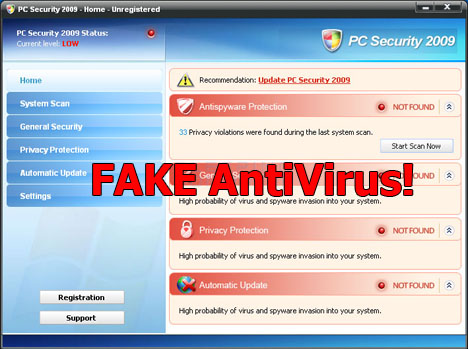
Antivirus PC 2009 is a misleading
application that classified as rogue antispyware program because it installed
through the use of trojans and uses false scan results and fake security
warnings in order to scare you into thinking that your PC in danger as method
to trick you to purchase so-called “full” version of the software.
Once installed, Antivirus PC 2009 will configure
itself to run automatically when Windows starts. Immediately after launch, the
rogue will begin to scan your computer and display scan results that state the
computer is infected with numerous infections. Important to know, all of these
infections are fake, so you can safely ignore them.

HTML
Hit Counter
Copyright© 2009-2015 SOMD Computer Repairs
This site was last
updated
03/14/15